



 English
 Translate
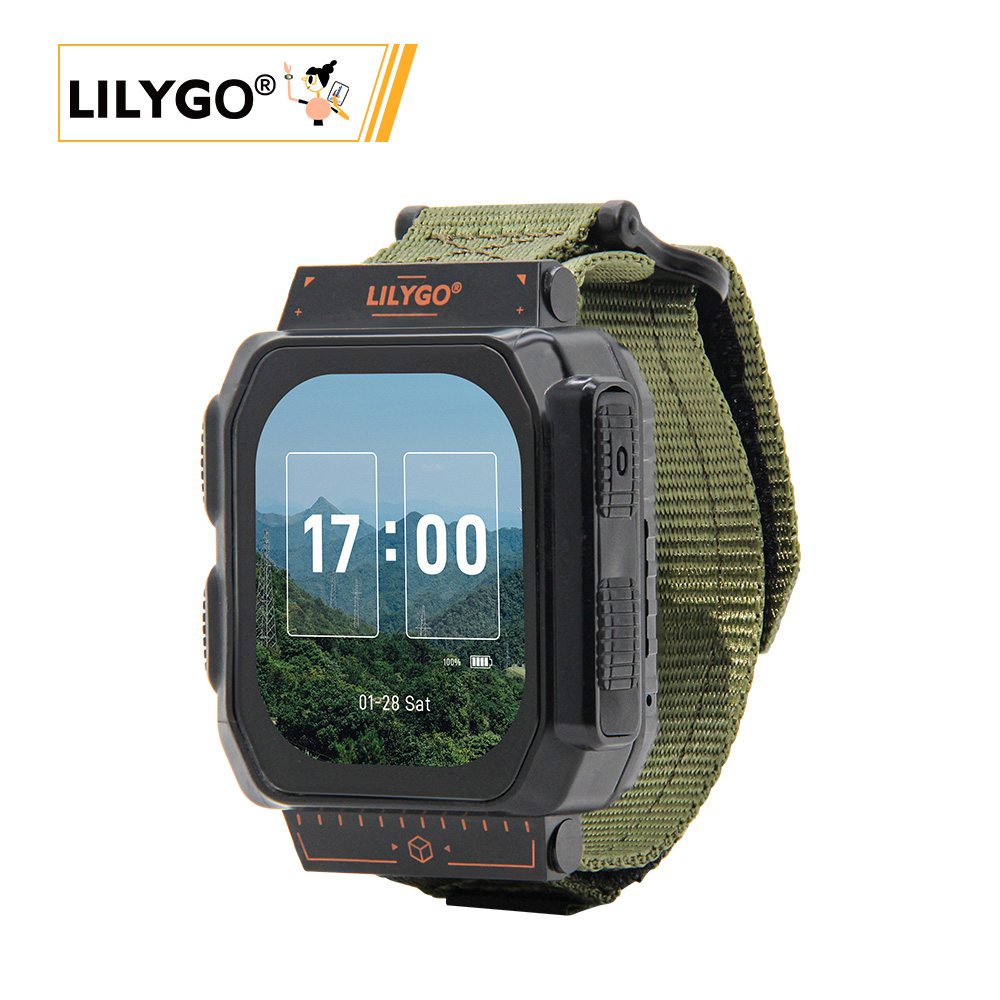
LILYGO T-Watch Ultra
Version Iteration:
| Version | Update date | Update description |
|---|---|---|
| T-Watch-Ultra_V1.0 | Latest Version | Initial version of high-performance smart watch development module |
Purchase Links
| Product | SOC | FLASH | PSRAM | Screen | LoRa | GNSS | Link |
|---|---|---|---|---|---|---|---|
| T-Watch Ultra | ESP32-S3 | 16M | 8M | 2.06" AMOLED | SX1262/SX1280 | MIA-M10Q | LILYGO Mall |
Table of Contents
- Description
- Preview
- Modules
- Quick Start
- Pin Overview
- Related Tests
- FAQ
- Projects
- Resources
- Dependent Libraries
Description
LILYGO T-Watch Ultra is a high-performance smart watch development module based on the ESP32-S3 dual-core processor, equipped with 16MB flash memory and 8MB PSRAM, supporting Arduino/ESP-IDF/MicroPython development environments. Core features are highly integrated:
- Display Interaction: Features a 2.06-inch AMOLED screen (410×502 resolution, 16 million colors), supports capacitive touch and QSPI high-speed rendering
- Quadruple Wireless Communication: Integrates Wi-Fi/BLE 5.0, LoRa (SX1262/SX1280, covering 433/868/915MHz bands), GNSS positioning (MIA-M10Q module) and NFC (ST25R3916)
- Intelligent Sensing & Feedback: Built-in BHI260AP AI motion sensor, DRV2605 haptic vibration motor and MAX98357A audio amplifier, enabling motion recognition and multimodal interaction
- Expansion & Battery Life: Supports MicroSD card expansion (32GB FAT32), dynamically optimized energy consumption by AXP2101 power management chip, paired with 1100mAh battery (4.07Wh)
- Industrial-grade Design: Compact size (49×63.5×22mm), wide temperature range operation (-40℃~85℃), suitable for outdoor sports equipment, industrial IoT gateways and other scenarios
Preview
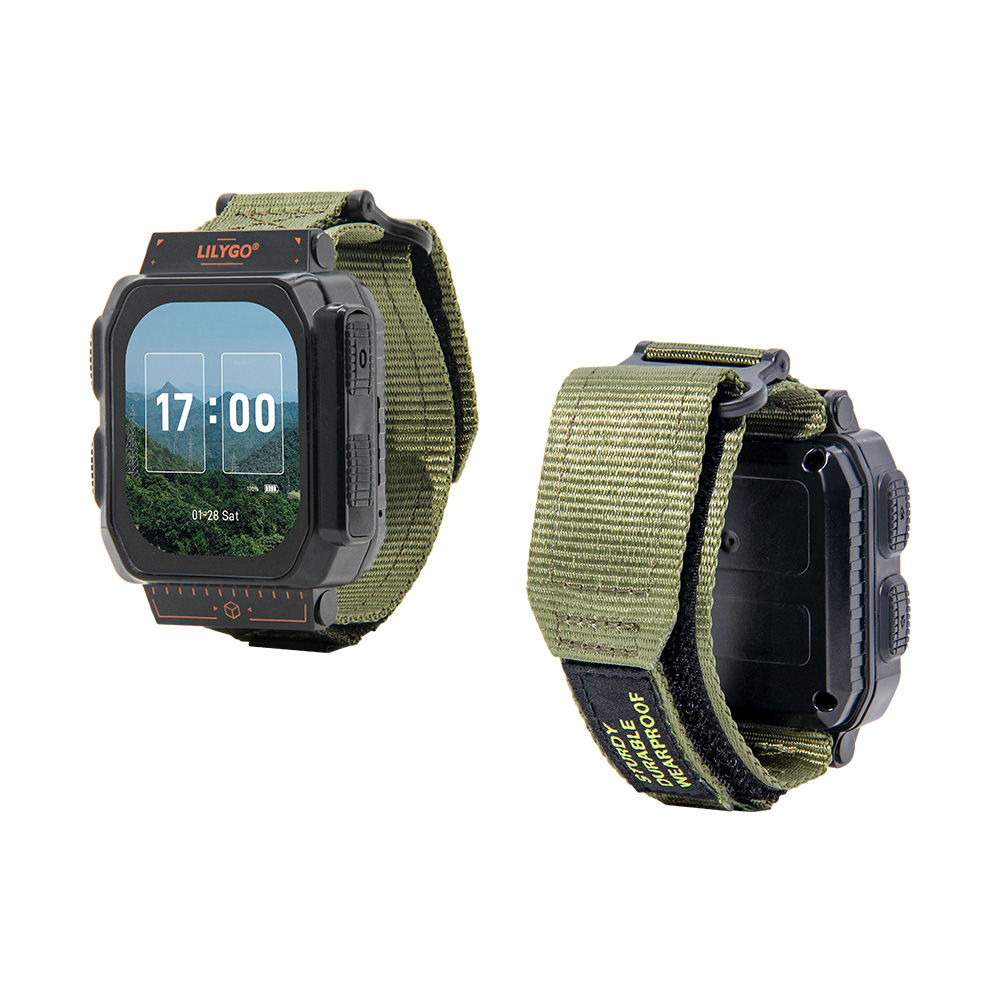
Physical Image
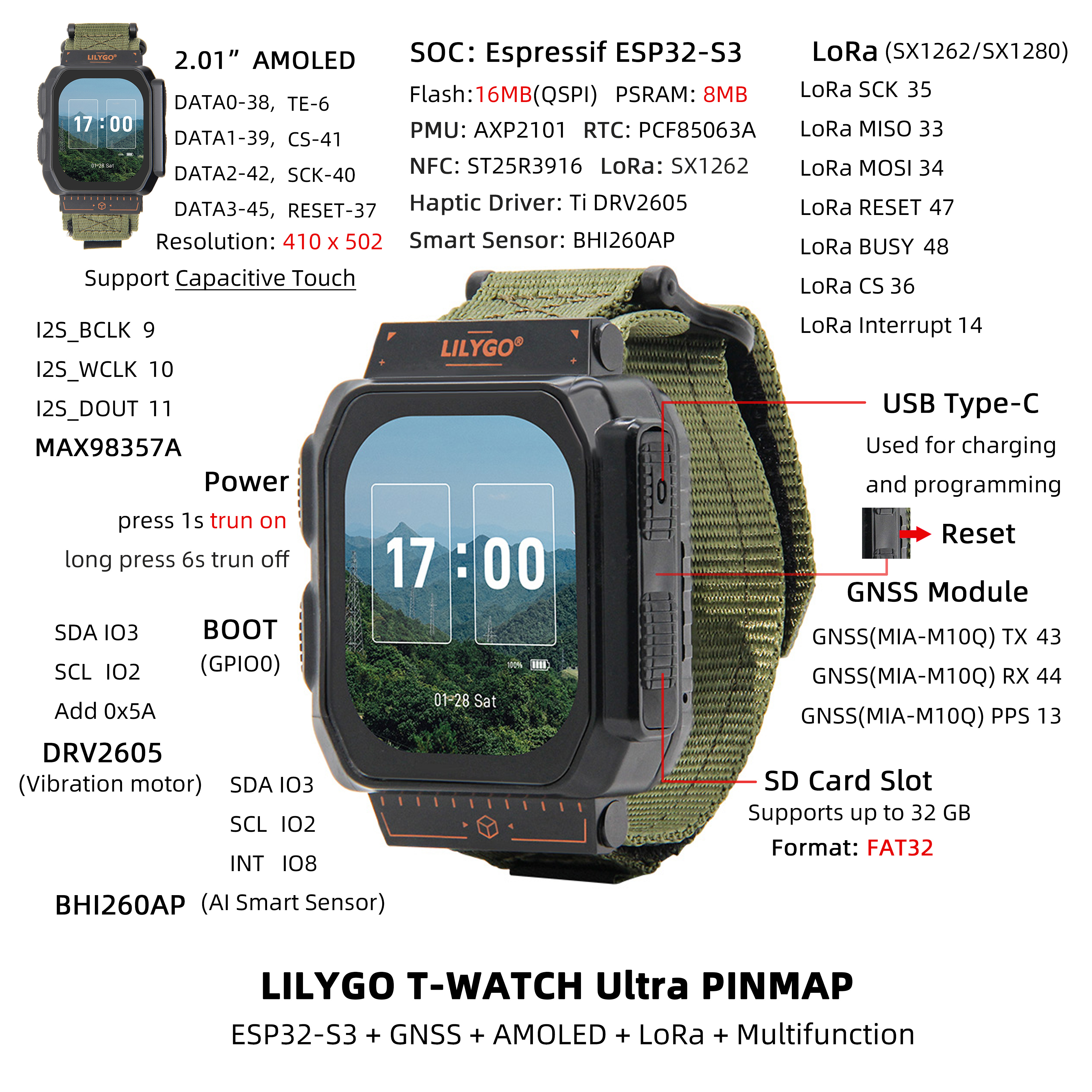
Pinout Diagram
Modules
MCU
- Chip: ESP32-S3
- PSRAM: 8MB (Octal SPI)
- FLASH: 16MB
- Architecture: Dual-core Xtensa LX7
- Wireless: Wi-Fi 802.11 b/g/n + Bluetooth 5.0
Display
- Size: 2.06-inch AMOLED
- Resolution: 410x502px
- Display Type: AMOLED
- Colors: 16 million colors
- Interface: QSPI
LoRa
- Chip: SX1262 / SX1280 (selectable)
- Frequency: 433-923MHz (SX1262) / 2.4GHz (SX1280)
GNSS Positioning
- Chip: MIA-M10Q
- Features: Multi-constellation GNSS receiver
AI Sensor
- Chip: BHI260AP
- Type: AI Motion Sensor
- Features: Supports complex motion recognition
NFC
- Chip: ST25R3916
- Function: Near Field Communication
Audio
- Amplifier: MAX98357A
- Interface: I2S
Power Management
- Chip: AXP2101
- Battery: 1100mAh Lithium Battery
- Charging: USB Type-C 5V
Expansion Interfaces
- IO Expansion: XL9555 (16 expansion IO interfaces)
- Storage: MicroSD card (max 32GB)
Communication Module
- Chip: T3902
- Function: Voice call support
Overview
| Component | Description |
|---|---|
| MCU | ESP32-S3 Dual-core Processor |
| FLASH | 16MB |
| PSRAM | 8MB (Octal SPI) |
| Display | 2.06-inch AMOLED (410×502) |
| Touch | CST9217 Capacitive Touchscreen |
| LoRa | SX1262 (433-923MHz) / SX1280 (2.4GHz) |
| GNSS | MIA-M10Q Multi-constellation Positioning |
| NFC | ST25R3916 |
| AI Sensor | BHI260AP Motion Sensor |
| Audio | MAX98357A Audio Amplifier |
| Vibration Motor | DRV2605 Haptic Feedback |
| Power Management | AXP2101 PMU |
| RTC | PCF85063A Real-Time Clock |
| IO Expansion | XL9555 (16 IOs) |
| Communication Module | T3902 |
| Storage | MicroSD Card Expansion |
| Battery | 1100mAh Lithium Battery |
| Wireless | Wi-Fi 802.11b/g/n + Bluetooth 5.0 |
| USB | 1 × USB OTG (Type-C Connector) |
| Buttons | POWER + BOOT (built-in) |
| Dimensions | 63.5×49×22mm (without strap) |
Quick Start
Example Support
| Example | PlatformIO/Arduino | ESP-IDF | Description |
|---|---|---|---|
| Watch UI | ✓ | Watch Interface Example | |
| GNSS Tracking | ✓ | Satellite Positioning Function | |
| LoRa Communication | ✓ | LoRa Communication Test | |
| AI Sensor | ✓ | Motion Recognition Example | |
| NFC Reader | ✓ | NFC Function Demo |
Arduino
- Tip: Arduino Manager URL: https://espressif.github.io/arduino-esp32/package_esp32_dev_index.json
Open
Arduino IDE->Sketch->Include Library->Add .ZIP Library->Select the library compressed package downloaded in step 3
- Copy all directories from LilyGoLib-ThirdParty to the ArduinoIDE libraries directory. If there is no "libraries" directory, please create it.
- Please note: do not copy the "LilyGoLib-ThirdParty" directory itself, but copy the folders inside the "LilyGoLib-ThirdParty" directory to the libraries directory.
- How to find the library location on your computer, please refer here
- Windows:
C:\Users\{Username}\Documents\Arduino - macOS:
/Users/{Username}/Documents/Arduino - Linux:
/home/{Username}/Arduino
Please note that the libraries in LilyGoLib-ThirdParty are not necessarily the latest versions. Before confirming the hardware is working properly, please do not upgrade the dependent library versions.
ArduinoIDE will prompt that new library versions are available for upgrade every time it opens.
Please confirm normal operation before attempting to update to the latest versions. If you encounter issues, please revert to the dependent library versions that worked properly. The current dependent library version list can be viewed here
File->Examples->LilyGOLib->helloworldTools->Board->esp32, please select from the table below:
| Arduino IDE Setting | Value |
|---|---|
| Board | LilyGo T-Watch-Ultra |
| Port | Your port |
| USB CDC On Boot | Enabled |
| CPU Frequency | 240MHZ(WiFi) |
| Core Debug Level | None |
| USB DFU On Boot | Disable |
| Erase All Flash Before Sketch Upload | Disable |
| Events Run On | Core 1 |
| JTAG Adapter | Disable |
| Arduino Runs On | Core 1 |
| USB Firmware MSC On Boot | Disable |
| Partition Scheme | 16M Flash(3M APP/9.9MB FATFS) |
| Board Revision | Radio-SX1262 |
| Upload Mode | UART0/Hardware CDC |
| Upload Speed | 921600 |
| USB Mode | CDC and JTAG |
- Board Revision Option, please select according to the actual purchased RF type. Current options include:
- Radio-SX1262 (Sub 1G LoRa)
- Radio-SX1280 (2.4G LoRa)
- Radio-CC1101 (Sub 1G (G)MSK, 2(G)FSK, 4(G)FSK, ASK, OOK)
- Radio-LR1121 (Sub 1G + 2.4G LoRa)
- Radio-SI4432 (Sub 1G ISM)
- Select
Port - Click
Upload, wait for compilation and writing to complete - If you cannot upload the sketch or the USB device keeps appearing on the computer, please manually switch the device to download mode.
- If there is no serial output, please check if "USB CDC On Boot" is set to "Enabled".
- The board version changes according to the actual RF module model. The current default version is SX1262.
- This library depends on the latest arduino-esp32 version. If it is lower than V3.3.0-alpha1, it will report an error.
T-Watch-Ultra Enter Download Mode
🤖 Is the USB port always frequently plugged and unplugged?
If you have installed third-party firmware (such as meshtastic), please be sure to follow the steps below to update the firmware, whether it is meshtastic firmware or lilygo factory firmware.
Download mode is only needed when the program does not allow code upload. Under normal circumstances, this step is not required.
Follow the steps below to switch your device to download mode.
- Connect the board via USB-C cable
- Press and hold the BOOT button, while simultaneously pressing the RST button
- Release the RST button
- Release the BOOT button
- The USB port should be fixed and will not blink again. You can click upload.
- Press the RST button to exit download mode
If the new code is written successfully but the device does not light up or has other issues, please use our factory test code to test whether the peripherals can work normally. Please click here to download the firmware and write it for testing.
Development Platforms
Pin Overview
| Name | GPIO NUM | Free |
|---|---|---|
| SDA | 3 | ❌ |
| SCL | 2 | ❌ |
| SPI MOSI | 34 | ❌ |
| SPI MISO | 33 | ❌ |
| SPI SCK | 35 | ❌ |
| SD CS | 21 | ❌ |
| SD MOSI | Share with SPI bus | ❌ |
| SD MISO | Share with SPI bus | ❌ |
| SD SCK | Share with SPI bus | ❌ |
| RTC(PCF85063A) SDA | Share with I2C bus | ❌ |
| RTC(PCF85063A) SCL | Share with I2C bus | ❌ |
| RTC(PCF85063A) Interrupt | 1 | ❌ |
| NFC(ST25R3916) CS | 4 | ❌ |
| NFC(ST25R3916) Interrupt | 5 | ❌ |
| NFC(ST25R3916) MOSI | Share with SPI bus | ❌ |
| NFC(ST25R3916) MISO | Share with SPI bus | ❌ |
| NFC(ST25R3916) SCK | Share with SPI bus | ❌ |
| Sensor(BHI260) Interrupt | 8 | ❌ |
| Sensor(BHI260) SDA | Share with I2C bus | ❌ |
| Sensor(BHI260) SCL | Share with I2C bus | ❌ |
| PCM Amplifier(MAX98357A) BCLK | 9 | ❌ |
| PCM Amplifier(MAX98357A) WCLK | 10 | ❌ |
| PCM Amplifier(MAX98357A) DOUT | 11 | ❌ |
| GNSS(MIA-M10Q) TX | 43 | ❌ |
| GNSS(MIA-M10Q) RX | 44 | ❌ |
| GNSS(MIA-M10Q) PPS | 13 | ❌ |
| LoRa(SX1262 or SX1280) SCK | Share with SPI bus | ❌ |
| LoRa(SX1262 or SX1280) MISO | Share with SPI bus | ❌ |
| LoRa(SX1262 or SX1280) MOSI | Share with SPI bus | ❌ |
| LoRa(SX1262 or SX1280) RESET | 47 | ❌ |
| LoRa(SX1262 or SX1280) BUSY | 48 | ❌ |
| LoRa(SX1262 or SX1280) CS | 36 | ❌ |
| LoRa(SX1262 or SX1280) Interrupt | 14 | ❌ |
| Display CS | 41 | ❌ |
| Display DATA0 | 38 | ❌ |
| Display DATA1 | 39 | ❌ |
| Display DATA2 | 42 | ❌ |
| Display DATA3 | 45 | ❌ |
| Display SCK | 40 | ❌ |
| Display TE | 6 | ❌ |
| Display RESET | 37 | ❌ |
| Charger(AXP2101) SDA | Share with I2C bus | ❌ |
| Charger(AXP2101) SCL | Share with I2C bus | ❌ |
| Charger(AXP2101) Interrupt | 7 | ❌ |
| Haptic Driver(DRV2605) SDA | Share with I2C bus | ❌ |
| Haptic Driver(DRV2605) SCL | Share with I2C bus | ❌ |
| Expand(XL9555) SDA | Share with I2C bus | ❌ |
| Expand(XL9555) SCL | Share with I2C bus | ❌ |
| Expand(XL9555) GPIO6 | Haptic Driver Enable | ❌ |
| Expand(XL9555) GPIO7 | Display Power supply enable | ❌ |
| Expand(XL9555) GPIO10 | Touchpad Reset | ❌ |
| Expand(XL9555) GPIO12 | SD Insert Detect | ❌ |
Related Tests
| Mode | Wake-Up Mode | Current |
|---|---|---|
| Light-Sleep | PowerButton + BootButton + TouchPanel | 4.6mA |
| Light-Sleep | PowerButton + BootButton | 2.1mA |
| DeepSleep | PowerButton + BootButton (Backup power on) | 1.1mA |
| DeepSleep | PowerButton + BootButton (Backup power off) | 840uA |
| DeepSleep | TouchPanel | 3.34mA |
| DeepSleep | Timer (Backup power on) | 850uA |
| DeepSleep | Timer (Backup power off) | 1.1mA |
| Power OFF | Only keep the backup power | 77uA |
FAQ
Q. What advantages does T-Watch Ultra have over other versions?
A. The Ultra version features a larger AMOLED screen, AI motion sensor, GNSS multi-constellation positioning, NFC functionality, and larger battery capacity, making it more comprehensive in features.Q. How to power on and off?
A. Press and hold the POWER button for 2 seconds to power on, hold for 6 seconds to power off. The BOOT button is a built-in button used for program uploading.Q. Which GNSS constellations are supported?
A. The MIA-M10Q module supports multiple satellite systems including GPS, GLONASS, Galileo, BeiDou, etc.Q. What special features does the AI sensor have?
A. The BHI260AP can recognize complex motion patterns, such as gesture recognition, activity classification, etc., suitable for motion monitoring applications.Q. What's the battery life like?
A. The 1100mAh battery can provide several days of battery life under normal use, depending on feature usage.
Projects
Resources
- Schematic
- ESP32-S3 Datasheet
- SX1262 Datasheet
- MIA-M10Q GNSS Datasheet
- BHI260AP Sensor Datasheet
- AXP2101 Power Management
Dependent Libraries
- TTGO_TWatch_Library - T-Watch Series Development Library
- LilyGoLib - LILYGO Device Universal Library
- Arduino_GFX - Graphics Display Library
- LVGL - Embedded Graphics Library
- RadioLib - LoRa Communication Library
- TinyGPSPlus - GPS Parsing Library