




 English
 Translate
LILYGO T-Halow-P4
📦 Project Versions
T-Halow-P4 is a high-performance upgrade version of the T-Halow series, based on ESP32-P4 main controller, integrating ESP32-C6 auxiliary processor and T-Halow module. Please select the corresponding documentation based on your needs:
| Version | Release Date | Main Features | Documentation Link |
|---|---|---|---|
| T-Halow-P4 | 2025-12-04 | ESP32-P4 + ESP32-C6 + T-Halow Module | GitHub Repository |
| T-Halow | 2023-08-23 | ESP32-S3 + T-Halow Module | T-Halow Documentation |
Note: T-Halow-P4 and T-Halow use the same AT Command Set.
Regarding the SDK for the TX-AH module, Taixin provides non-OS drivers, refer to: taixin-nonos-driver
🚀 Product Overview
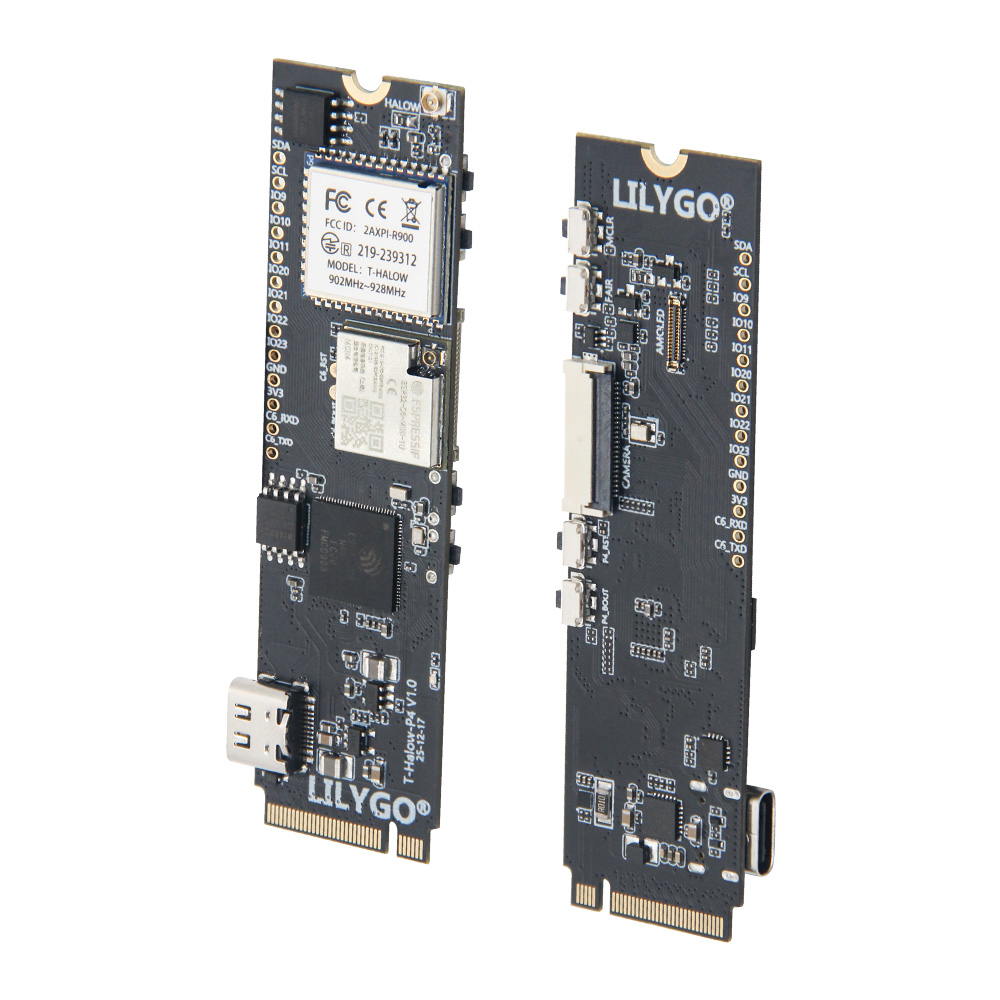
LILYGO T-Halow-P4 is a high-performance IoT development board based on ESP32-P4 main controller, integrating ESP32-C6 auxiliary processor and T-Halow long-range communication module. Designed for scenarios requiring high-performance processing, long-range communication, and multimedia applications, suitable for intelligent security, industrial monitoring, remote inspection, and other professional applications.
Core Features
- ✅ High-Performance Processing: ESP32-P4 main controller, supports complex graphics and video task processing
- ✅ Dual-Core Collaboration: ESP32-C6 auxiliary processor, supports Wi-Fi 6 and Bluetooth 5.3
- ✅ Long-Range Communication: T-Halow module supports Wi-Fi HaLow (802.11ah)
- ✅ Multimedia Interfaces: Onboard MIPI-DSI display interface and MIPI-CSI camera interface
- ✅ Image Processing: Supports JPEG image decoding (1080P 30fps), PPA, 2D DMA
- ✅ Video Encoding: Supports H264 encoding, JPEG encoding, 1080P video
- ✅ Rich Peripherals: Supports SPI, I2S, I2C, LED PWM, Ethernet, etc.
📊 Hardware Specifications
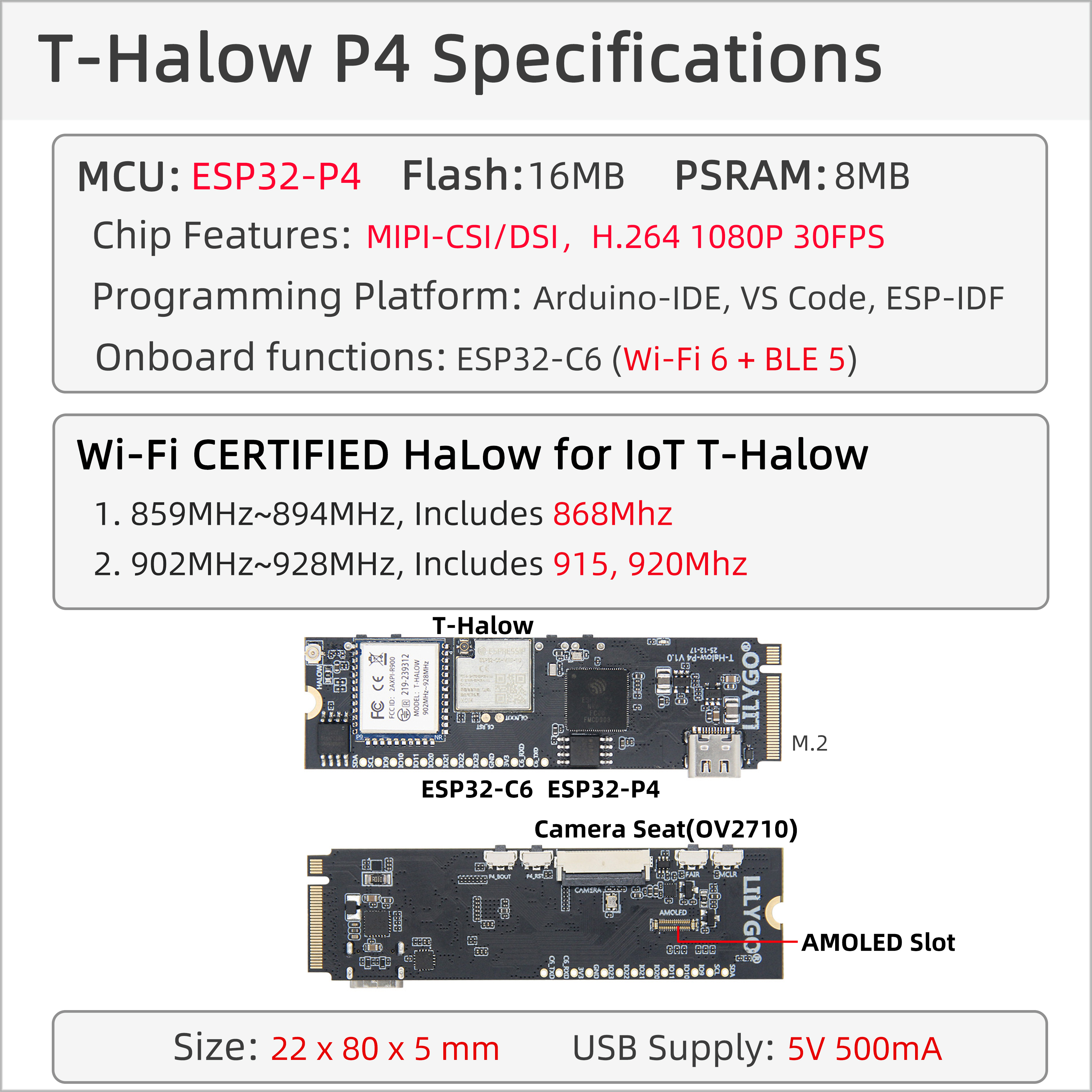
| Item | Parameter |
|---|---|
| Main Controller Chip | ESP32-P4 (High-Performance Processor) |
| Auxiliary Processor | ESP32-C6-MINI (Wi-Fi 6 + Bluetooth 5.3) |
| Flash Storage | 16MB Nor Flash (QSPI Interface) |
| PSRAM | 32MB (Package-Stacked) |
| Wireless Protocol | Wi-Fi 6 + Bluetooth 5.3 (ESP32-C6) |
| Wi-Fi HaLow | Supports 802.11ah Long-Range Communication |
| Display Interface | MIPI-DSI, Supports Touch |
| Camera Interface | MIPI-CSI, Supports 1080P Video |
| Image Processing | JPEG Decoding (1080P 30fps), PPA, 2D DMA |
| Video Encoding | H264 Encoding, JPEG Encoding |
| Peripheral Interfaces | SPI, I2S, I2C, LED PWM, Ethernet, etc. |
| Programming Platform | ESP-IDF v5.4.1+ |
| Development Environment | Visual Studio Code |
Pin Definition (PINMAP)
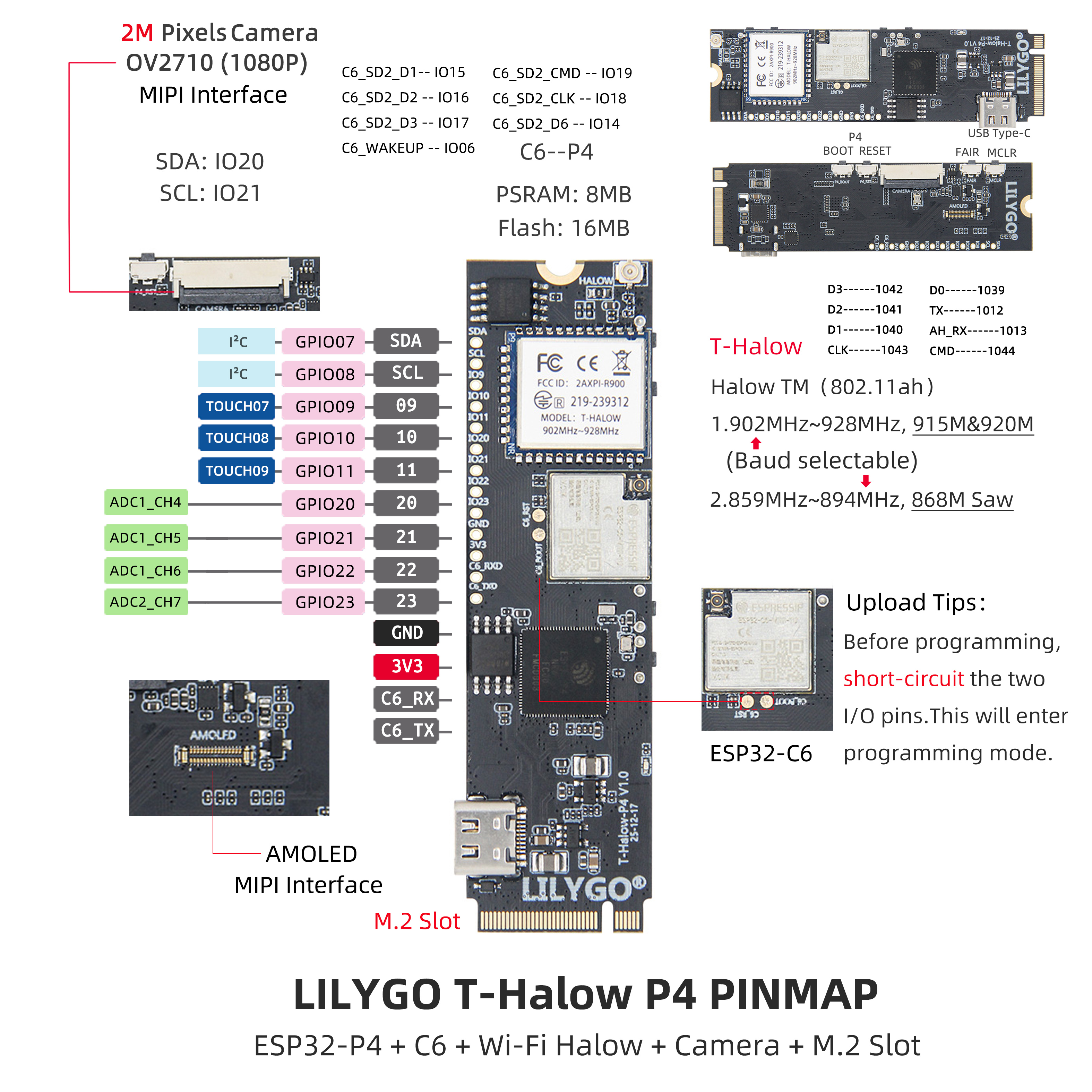
I2C Pins:
- I2C_SCL: IO8
- I2C_SDA: IO7
Halow Module Pins:
- AH_CMD: IO44
- AH_CLK: IO43
- AH_D3: IO42
- AH_D2: IO41
- AH_D1: IO40
- AH_D0: IO39
- AH_TX: IO12
- AH_RX: IO13
ESP32-C6 Pins:
- ESP32C6_CMD: IO19
- ESP32C6_CLK: IO18
- ESP32C6_D3: IO17
- ESP32C6_D2: IO16
- ESP32C6_D1: IO15
- ESP32C6_D0: IO14
- ESP32C6_WAKEUP: IO6
Camera/Display Pins:
- TOUCH_SCL: IO8
- TOUCH_SDA: IO7
- TOUCH_INT: IO11
- TOUCH_RST: IO10
- MIPI_DSI_RST: IO9
                                   GND                                                                   GND
                ┌────────────────────────────────────────────────┐             ┌─────────────────────────────────────────────────────────┐
                │                                                │             │                                                         │
                │                                                │             │                                                         │
                │                                                │             │                                                         │
                │                                                │             │                                                         │
                │                                                │             │                                                         │
                │                                                │             │                                                         │
                │                                                │             │                                                         │
                │                                                │             │                                                         │
                │                                ┌───────────────┴─────────────┴──────────────────┐                                      │
                │                                │                                                │                           ┌──────────┴───────────┐
                │                                │                                                │      DSI DATA 1P          │                      │
                │                                │                                                ├───────────────────────────┤                      │
    ┌───────────┴─────────┐ CSI DATA 1P          │                                                │                           │                      │
    │                     ├──────────────────────┤                                                │      DSI DATA 1N          │                      │
    │                     │                      │                                                ├───────────────────────────┤                      │
    │                     │ CSI DATA 1N          │                  ESP32-P4                      │                           │                      │
    │       Camera        ├──────────────────────┤                                                │      DSI CLK N            │      LCD Screen      │
    │                     │                      │                                                ├───────────────────────────┤                      │
    │                     │ CSI CLK N            │                                                │                           │                      │
    │                     ├──────────────────────┤                                                │      DSI CLK P            │                      │
    │                     │                      │                                                ├───────────────────────────┤                      │
    │                     │ CSI CLK P            │                                                │                           │                      │
    │                     ├──────────────────────┤                                                │      DSI DATA 0P          │                      │
    │                     │                      │                                                ├───────────────────────────┤                      │
    │                     │ CSI DATA 0P          │                                                │                           │                      │
    │                     ├──────────────────────┤                                                │      DSI DATA 0N          │                      │
    │                     │                      │                                                ├───────────────────────────┤                      │
    │                     │ CSI DATA 0N          │                                                │                           │                      │
    │                     ├──────────────────────┤                                                │                           └──────────────────────┘
    │                     │                      │                                                │
    └───────┬──┬──────────┘                      │                                                │
            │  │           I2C SCL               │                                                │
            │  └─────────────────────────────────┤                                                │
            │              I2C SDA               │                                                │
            └────────────────────────────────────┤                                                │
                                                 └────────────────────────────────────────────────┘
📡 Technical Features Introduction
Wi-Fi HaLow (802.11ah)
Wi-Fi HaLow is a long-range, low-power Wi-Fi standard optimized for IoT. With the same transmission power, it offers longer transmission distance and stronger wall penetration capability compared to traditional 2.4GHz/5GHz Wi-Fi.
T-Halow-P4 equipped with Taixin TX-AH module supports:
- Operating frequency band: 730–950MHz
- Channel bandwidth: 1/2/4/8MHz adjustable
- Physical throughput: 150Kbps – 32.5Mbps
- Transmission distance: Up to several kilometers (depending on environment)
ESP32-P4 High-Performance Processing
ESP32-P4 is a high-performance processor designed for complex graphics and video tasks:
- Supports JPEG image decoding (1080P 30fps)
- Pixel Processing Accelerator (PPA)
- 2D DMA image accelerator
- Supports H264 and JPEG video encoding
ESP32-C6 Wireless Connectivity
ESP32-C6 provides advanced wireless connectivity capabilities:
- Supports Wi-Fi 6 (802.11ax)
- Bluetooth 5.3
- Uses esp-hosted-mcu solution
- Communicates with ESP32-P4 via SDIO
🔄 Quick Start
Development Environment Setup
The project examples are compiled in ESP-IDF v5.4.1 environment. When using T-Halow-P4, ensure ESP-IDF version ≥ 5.4.1.
Environment Setup Steps:
- Install ESP-IDF v5.4.1+ (refer to official documentation)
- Clone T-Halow-P4 project repository
- Enter examples directory and select example program
Project Compilation and Flashing
Compilation Steps:
cd ~/examples/xxx
idf.py set-target esp32p4
idf.py build
Download Mode Setup:
- Plug in USB, open serial port tool
- Hold BOOT button without releasing
- Press RST button and release immediately
- Serial output "wait for download" indicates entering download mode
- Release BOOT button, close serial port
Program Flashing:
idf.py -p PORT flash
Halow Module Usage
Halow module connects to ESP32-P4 via SPI + UART:
- SPI: For data transmission, using Taixin official drivers
- UART: For sending/receiving AT commands and displaying runtime information
Data transmission link:
ESP32P4 -> SPI/SDIO -> Halow -> RF(AP) -> RF(STA) -> SPI/SDIO -> Halow -> ESP32P4
📚 Official Documentation (English)
For more information about the TX-AH module, please visit Taixin's official website: Resources Download
| Document Name | Link |
|---|---|
| Frequency Setting Instructions | Download |
| TX-AH-Rx00P Series Module Technical Specification | Download |
| TX-AH-Rx00P Bridge Instructions | Download |
| AH Module AT Command Development Guide | Download |
| AH Module Development Board Instructions | Download |
| AH Module Hardware Design Guide | Download |
| AH Performance Test Method | Download |
| AH-RF EMC Certification Guide | Download |
📊 TX-AH Model Comparison
| Module Name | Front Silkscreen Marking | Certification Status | Supported Frequency Band | Remarks |
|---|---|---|---|---|
| TX-AH-R900P | Bottom-left P9, Bottom-right P9 | FCC/CE Certifiable | 860MHz ~ 928MHz | Standard Version |
| TX-AH-R900PNR | Bottom-left P9, Bottom-right NR | FCC Certifiable | 902MHz ~ 928MHz | With 915M Saw, improved reception |
| TX-AH-R900PNR-860M | Bottom-left 86, Bottom-right NR | CE Certifiable | 859MHz ~ 894MHz | With 875M Saw, improved reception |
Remarks:
- Differences between P series modules and early A series modules:
- (1) P series bottom-left silkscreen starts with P, A series starts with R
- (2) P series PIN4/5 require power supply, A series do not
- Modules default without shielding case, shielded versions add -S suffix to module name (S indicates Shield)
🚀 Quick Start
🟢 PlatformIO is recommended as these examples were developed on PlatformIO. 🟢
PlatformIO Development Environment
- Install Visual Studio Code and Python, clone or download this project;
- Search for and install the
PlatformIOextension in VSCode extensions; - Restart VSCode after installation;
- Open this project, PlatformIO will automatically download required third-party libraries and dependencies, first-time process may take longer, please be patient;
- After all dependencies are installed, open the
platformio.iniconfiguration file, uncomment and select example programs inexample, then pressCtrl+Sto save; - Click ☑️ at the bottom of VSCode to compile the project, insert USB and select COM port in VSCode;
- Finally click ➡️ button to download the program to Flash;
Arduino IDE Development Environment
Install Arduino IDE
Copy and paste all files from
this project/lib/to Arduino library path (usuallyC:\\Users\\username\\Documents\\Arduino\\libraries);Open Arduino IDE, click
File -> Openin the upper left corner, open the example underthis project/example/xxx/xxx.ino;Configure Arduino as follows, then click the upper left button in Arduino to compile and download;
| Arduino IDE Setting | Value |
|---|---|
| Board | ESP32S3 Dev Module |
| Port | Your port |
| USB CDC On Boot | Enable |
| CPU Frequency | 240MHZ(WiFi) |
| Core Debug Level | None |
| USB DFU On Boot | Disable |
| Erase All Flash Before Sketch Upload | Disable |
| Events Run On | Core1 |
| Flash Mode | QIO 80MHZ |
| Flash Size | 16MB(128Mb) |
| Arduino Runs On | Core1 |
| USB Firmware MSC On Boot | Disable |
| Partition Scheme | 16M Flash(3M APP/9.9MB FATFS) |
| PSRAM | OPI PSRAM |
| Upload Mode | UART0/Hardware CDC |
| Upload Speed | 921600 |
| USB Mode | CDC and JTAG |
🧭 Application Scenarios
- 🏭 Industrial Security Monitoring: High-performance image processing + HaLow long-range communication
- 🌾 Agricultural Environmental Monitoring: Large-scale farmland sensor data collection and remote monitoring
- 🏗️ Construction Site Inspection: Long-range video inspection and equipment status monitoring
- 🔬 Scientific Field Data Collection: Long-range reliable data transmission and multimedia processing
- 📡 IoT Gateway: Connecting large numbers of low-power sensor nodes
- 🎥 Smart Camera: Remote monitoring system supporting H264 encoding
⚠️ Important Notes
❗ For more TX-AH module resources, please refer to Taixin's official website: Resources Download Address
📚 Resources Download
Official Documentation
- T-Halow-P4 GitHub Repository
- Taixin non-os WiFi Driver Development Guide
- Taixin AH Module AT Command Development Guide
- AT Command Set Documentation
Development Resources
Dependencies
espressif/esp_hosted^1.4.1espressif/esp_wifi_remote^0.8.5espressif/esp_lcd_ek79007^1.0.2lvgl/lvgl