
Claude Desktop Buddy
Claude for macOS and Windows can connect Claude Code and Claude desktop to maker devices over BLE, so developers and makers can build hardware that displays permission prompts, recent messages, and other interactions.
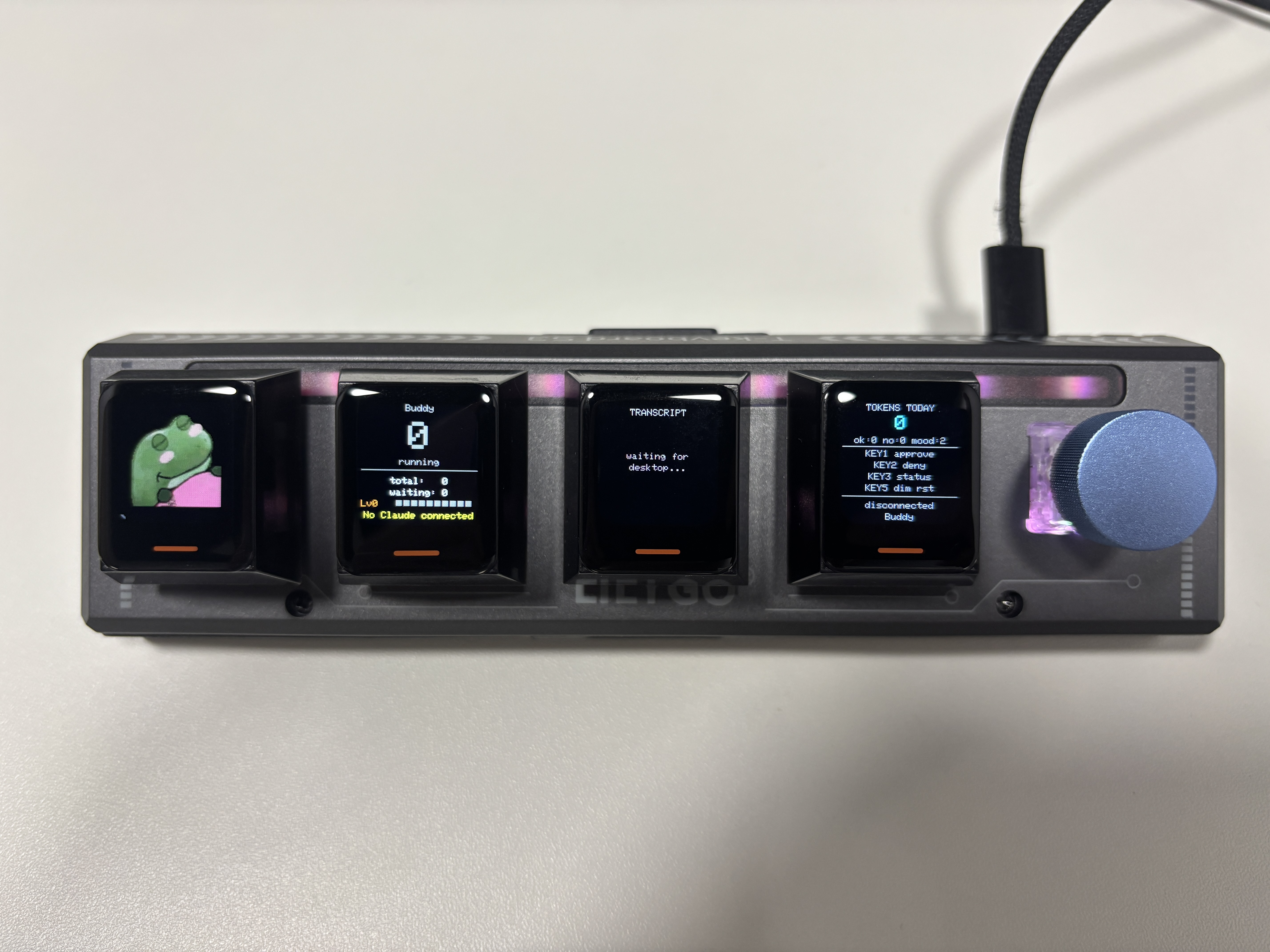
As an example, we built a desk pet on the T-Keyboard S3 Pro that lives off permission approvals and interaction with Claude. It sleeps when nothing's happening, wakes when sessions start, gets visibly impatient when an approval prompt is waiting, and lets you approve or deny right from the keyboard.
Hardware
The firmware targets the T-Keyboard S3 Pro (ESP32-S3 + 4 × 128×128 TFT panels). It uses the T-Keyboard-S3-Pro-Library for display, key, RGB, and encoder drivers.
Panel Layout
The four displays are divided into dedicated panels (left → right):
| Panel | Content |
|---|---|
| 0 | Character — GIF animation (if installed) or ASCII cat fallback |
| 1 | Session status — running / waiting / total sessions + level bar |
| 2 | Transcript lines or approval prompt |
| 3 | Token counter, approval stats, key guide |
Flashing
ESP32 烧录工具 (官方API)
选择固件
操作日志
Building from Source
PlatformIO
# Clone the library repository (contains the example)
git clone https://github.com/Xinyuan-LilyGO/T-Keyboard-S3-Pro-Library
cd T-Keyboard-S3-Pro-Library/examples/Advanced/Claude-Desktop-Buddy

# Build and upload
pio run -t upload

# Upload the LittleFS filesystem image (needed for GIF character packs)
pio run -t uploadfs
The platformio.ini targets esp32-s3-devkitc-1 with 16 MB flash, OPI PSRAM, and LittleFS. Dependencies are resolved automatically:
| Library | Version |
|---|---|
| LovyanGFX | ^1.1.0 |
| ButtonSense | ^1.0.0 |
| AnimatedGIF | ^2.1.1 |
| ArduinoJson | ^7.0.0 |
Arduino IDE
- Install the T-Keyboard-S3-Pro-Library and its dependencies (LovyanGFX, ButtonSense, AnimatedGIF, ArduinoJson) via Library Manager.
- Open
Claude-Desktop-Buddy.ino. - Configure the board:
| Setting | Value |
|---|---|
| Board | ESP32S3 Dev Module |
| USB Mode | Hardware CDC and JTAG |
| USB CDC On Boot | Enabled |
| Flash Size | 16MB (128Mb) |
| Partition Scheme | Default (6.25MB APP/3.43MB SPIFFS) |
| PSRAM | OPI PSRAM |
- Click Upload.
Pairing
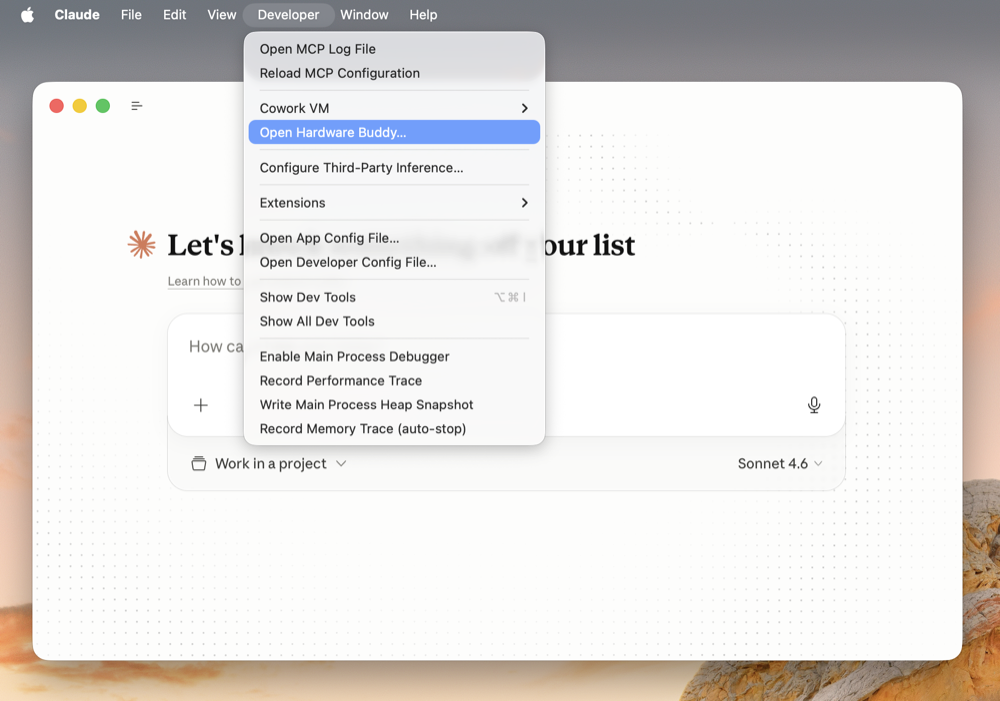
To pair your device with Claude, first enable developer mode in the Claude desktop app (Help → Troubleshooting → Enable Developer Mode). Then open Developer → Open Hardware Buddy…, click Connect, and pick TKB-S3-Buddy from the list. macOS will prompt for Bluetooth permission on first connect; grant it.
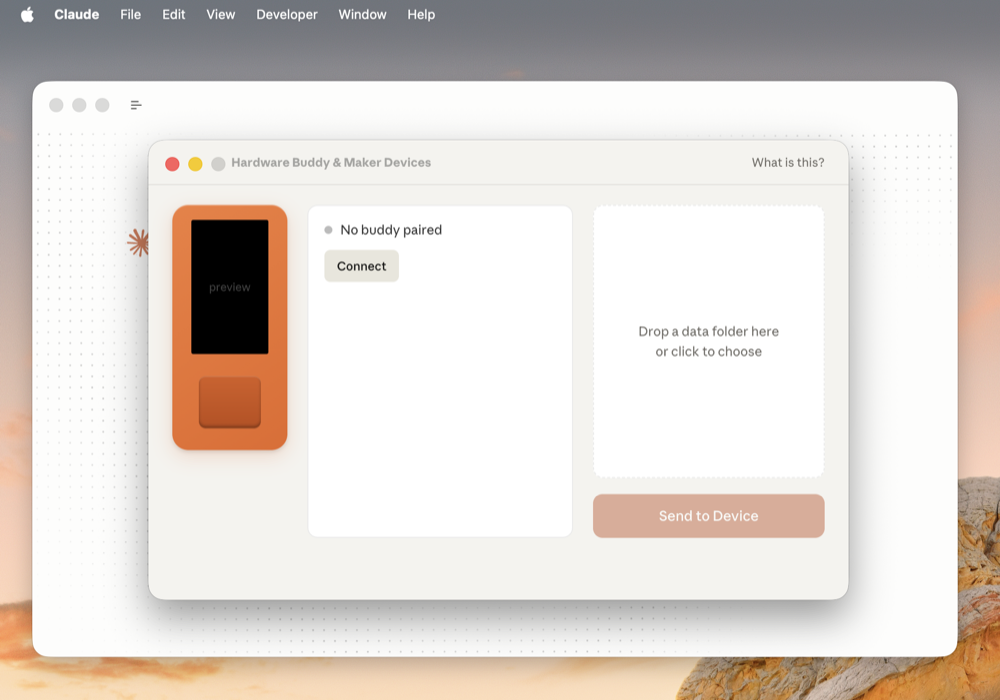
Once paired, the bridge auto-reconnects whenever both sides are awake.
If the device doesn't appear in the scan list:
- Press any key to wake the keyboard from sleep
- Make sure BLE is advertising — a fresh power cycle clears any stale state
The device also accepts the same JSON protocol over USB Serial at 115200 baud, so you can connect directly via USB without BLE.
Controls
| Normal | Approval pending | |
|---|---|---|
| KEY1 | — | Approve ("once") |
| KEY2 | — | Deny |
| KEY3 | Refresh stats panel | — |
| KEY5 | Reset brightness to 70% | — |
| Rotary encoder | Adjust display brightness | — |
KEY1–KEY5 refer to the five physical switches on the host unit (left to right: KEY1 = leftmost mechanical key, KEY5 = rotary encoder click).
The Seven States
The character animates through seven states driven by what Claude is doing:
| State | Trigger | LED accent |
|---|---|---|
sleep | BLE/USB not connected | Dim blue |
idle | Connected, nothing running | Soft cyan |
busy | Sessions actively running | Green |
attention | Approval prompt pending | Amber, bright |
celebrate | Session completed, or every 50 K tokens | Rainbow cycle |
dizzy | — (one-shot, no HW trigger on keyboard) | Purple |
heart | Approved in under 5 s | Red |
ASCII Pets
The firmware ships with an ASCII cat as the default character. It displays all seven animations without any additional files.
GIF Character Packs
Drag a character pack folder onto the drop target in the Hardware Buddy window to install a custom GIF character. The app streams it over BLE and the device switches to GIF mode live. Settings → delete char reverts to ASCII mode.
A character pack is a folder containing manifest.json and GIF files:
{
  "name": "bufo",
  "colors": {
    "body": "#6B8E23",
    "bg": "#000000",
    "text": "#FFFFFF",
    "textDim": "#808080",
    "ink": "#000000"
  },
  "states": {
    "sleep": "sleep.gif",
    "idle": ["idle_0.gif", "idle_1.gif", "idle_2.gif"],
    "busy": "busy.gif",
    "attention": "attention.gif",
    "celebrate": "celebrate.gif",
    "dizzy": "dizzy.gif",
    "heart": "heart.gif"
  }
}
State values can be a single filename or an array. Arrays rotate on each loop end — useful for an idle carousel so the home screen doesn't repeat one clip.
GIFs must be 96 px wide; heights up to ~128 px fit comfortably on the 128 × 128 panel. The whole pack must stay under 1.8 MB — gifsicle --lossy=80 -O3 --colors 64 typically cuts 40–60 %.
To skip the BLE round-trip while iterating on a character, stage it directly:
# from the Claude-Desktop-Buddy sketch directory
python3 tools/flash_character.py characters/bufo
# stages into data/ and runs: pio run -t uploadfs
Project Layout
Claude-Desktop-Buddy/
  Claude-Desktop-Buddy.ino  — main loop, state machine, panel rendering
  buddy_ble.h               — BLE Nordic UART Service bridge
  buddy_character.h/.cpp    — LittleFS GIF decoder + renderer
  buddy_xfer.h              — BLE folder-push receiver
  buddy_data.h              — JSON state parser
  buddy_stats.h             — NVS-backed stats, level, owner, pet name
  buddy_cat.h               — ASCII cat fallback animations
  data/                     — LittleFS image root (GIF character packs)
Availability
The BLE API is only available when the Claude desktop app is in developer mode (Help → Troubleshooting → Enable Developer Mode). It is intended for makers and developers and is not an officially supported product feature.