
T3-S3 LR1121 get it now
Overview
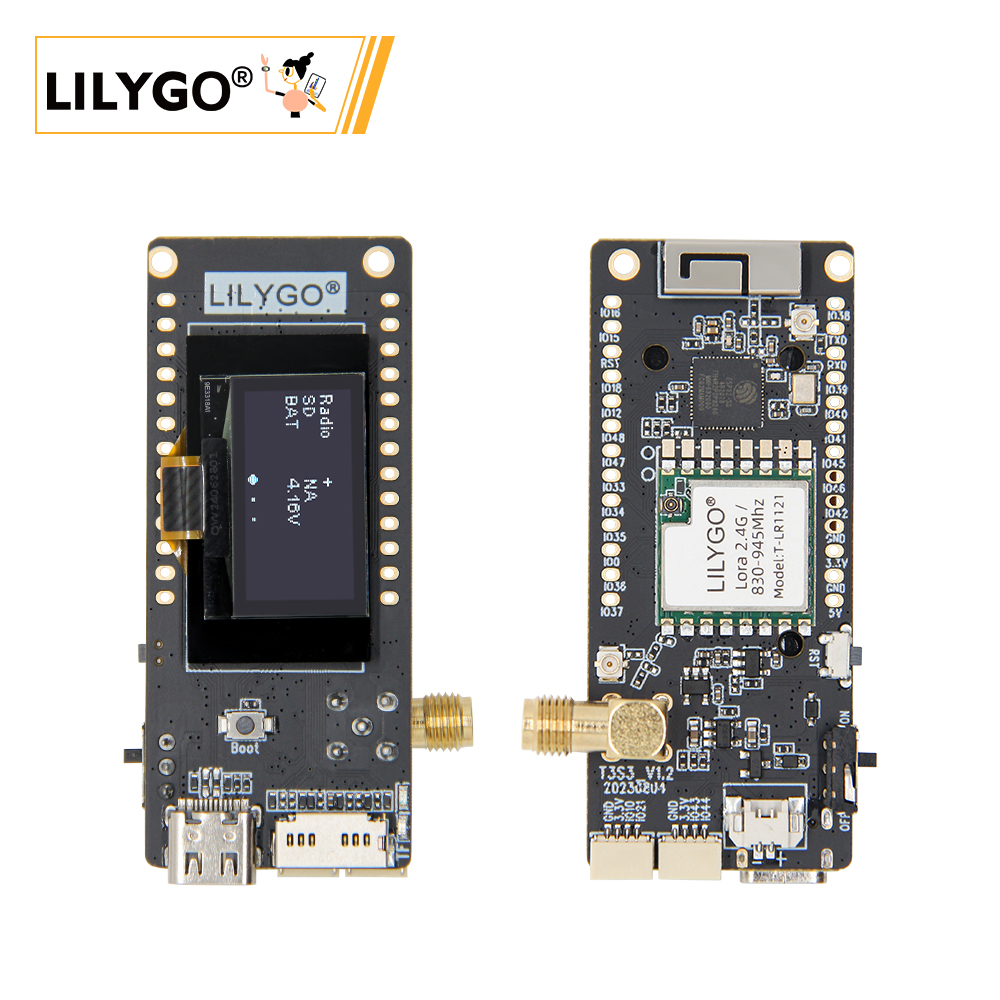
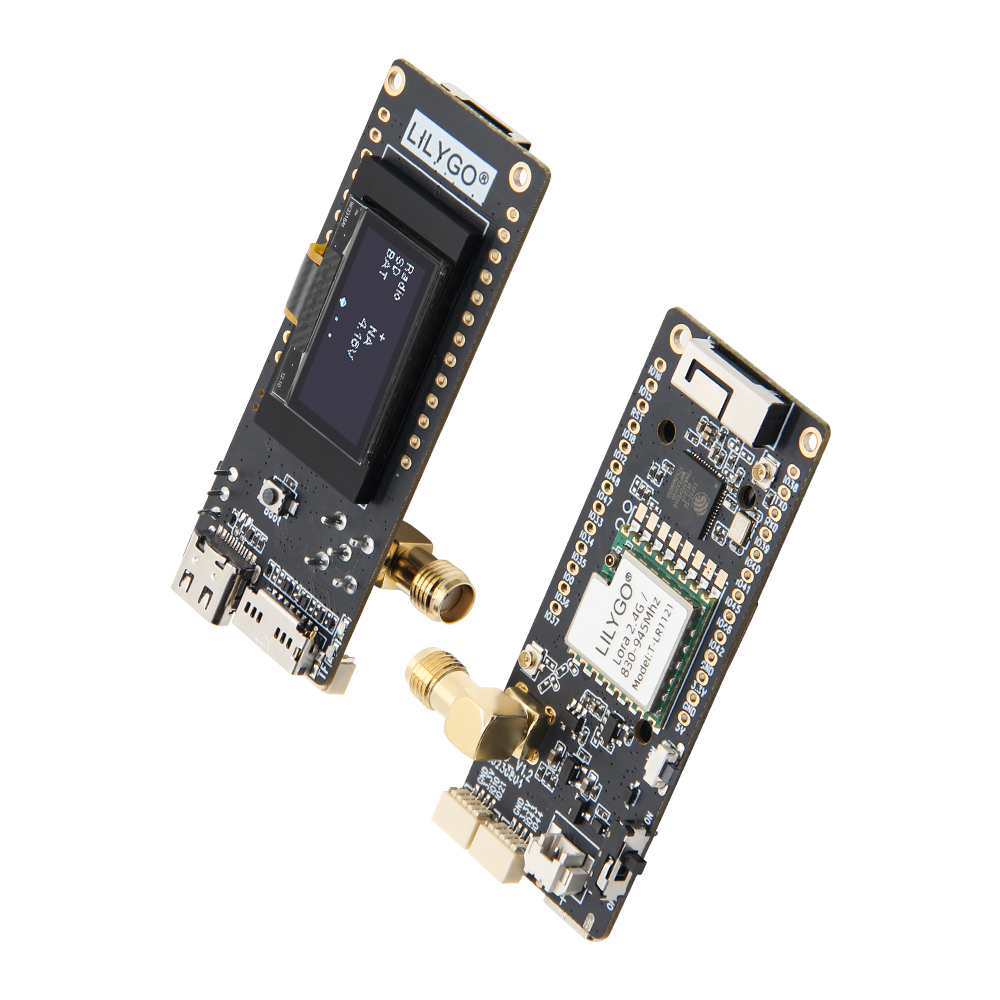
LILYGO T3-S3 LR1121 is a highly integrated IoT development board based on ESP32-S3FH4R2, supporting dual-band LoRa communication at 2.4 GHz and 830–945 MHz via the LR1121 chip, covering long-distance transmission requirements (10 km+) and compatible with spectrum regulations worldwide. The onboard 1.3-inch I2C OLED displays data in real-time; a PCF85063ATL RTC provides timekeeping; and a TF card slot enables storage expansion. Combined with Wi-Fi/Bluetooth 5.0, it enables multi-protocol interconnection. Suitable for smart agriculture monitoring, industrial equipment management, emergency communication networks, and smart home gateways.
Quick Start
Example Support
| Example | PlatformIO/Arduino | ESP-IDF | Description |
|---|---|---|---|
| LilyGo-LoRa-Series | ✓ | LR1121 Dual-band, OLED, RTC, SD Card examples |
PlatformIO
- Install Visual Studio Code and Python
- Search for and install the PlatformIO IDE extension in VS Code
- After restarting VS Code, click File → Open Folder → select the
LilyGo-LoRa-Seriesdirectory - Wait for dependency libraries to install
- Open
platformio.ini, underdefault_envsuncomment your board name - Uncomment one
src_dir = xxxxline (only one active at a time) - Click ✓ to compile, connect via USB-C, click → to upload
Arduino
- Install Arduino IDE
- Install Arduino ESP32
- Copy all folders from the
libdirectory to your Arduino libraries folder:- Windows:
C:\Users\{Username}\Documents\Arduino - macOS:
/Users/{Username}/Documents/Arduino - Linux:
/home/{Username}/Arduino
- Windows:
- Open the example
.inofile from theexamplesdirectory - In Tools → Board, configure:
| Arduino IDE Setting | Value |
|---|---|
| Board | LilyGo T3-S3 |
| Port | Your port |
| USB CDC On Boot | Enable |
| CPU Frequency | 240 MHz (WiFi) |
| Core Debug Level | None |
| USB DFU On Boot | Disable |
| Erase All Flash Before Sketch Upload | Disable |
| Events Run On | Core1 |
| Arduino Runs On | Core1 |
| USB Firmware MSC On Boot | Disable |
| Partition Scheme | Default 4MB with spiffs (1.2MB APP/1.5MB SPIFFS) |
| PSRAM | QSPI PSRAM |
| Board Revision | Radio-LR1121 |
| Upload Mode | UART0/Hardware CDC |
| Upload Speed | 921600 |
| USB Mode | CDC and JTAG |
| Programmer | Esptool |
- Click Upload
If upload fails: hold BOOT, press RST, release RST, then click Upload.
Development Platforms
Video
Key Features
- ESP32-S3FH4R2 dual-core LX7 @ 240 MHz, Wi-Fi + Bluetooth 5.0
- LR1121 dual-band LoRa: 830–945 MHz + 2.4 GHz (up to 10 km+)
- 1.3-inch I2C OLED display
- PCF85063ATL Real-time Clock (I2C)
- 4 MB Flash + 2 MB QSPI PSRAM + TF card slot
- USB-C power (5 V / 500 mA) + 1.25 mm battery interface
- 2 × QWIIC interfaces, 2.54mm 2×20 GPIO expansion
Product Parameters
| Feature | Specification |
|---|---|
| MCU | ESP32-S3FH4R2 @ Dual-core LX7, 240 MHz |
| Flash | 4 MB |
| PSRAM | 2 MB (QSPI) |
| Wi-Fi | 2.4 GHz 802.11 b/g/n |
| Bluetooth | Bluetooth 5.0 |
| LoRa | LR1121, 400–520 MHz / 830–945 MHz / 2400–2500 MHz |
| Display | 1.3-inch OLED, I2C |
| RTC | PCF85063ATL (I2C) |
| Storage | TF card slot |
| USB | 1 × Type-C |
| Battery | 1.25 mm connector, 3.7 V |
| Expansion | 2 × QWIIC, 2.54mm 2×20 GPIO |
| Power Input | 5 V / 500 mA |
| Mounting Holes | 2 × M2 |
| Dimensions | 66 × 27 × 15 mm |
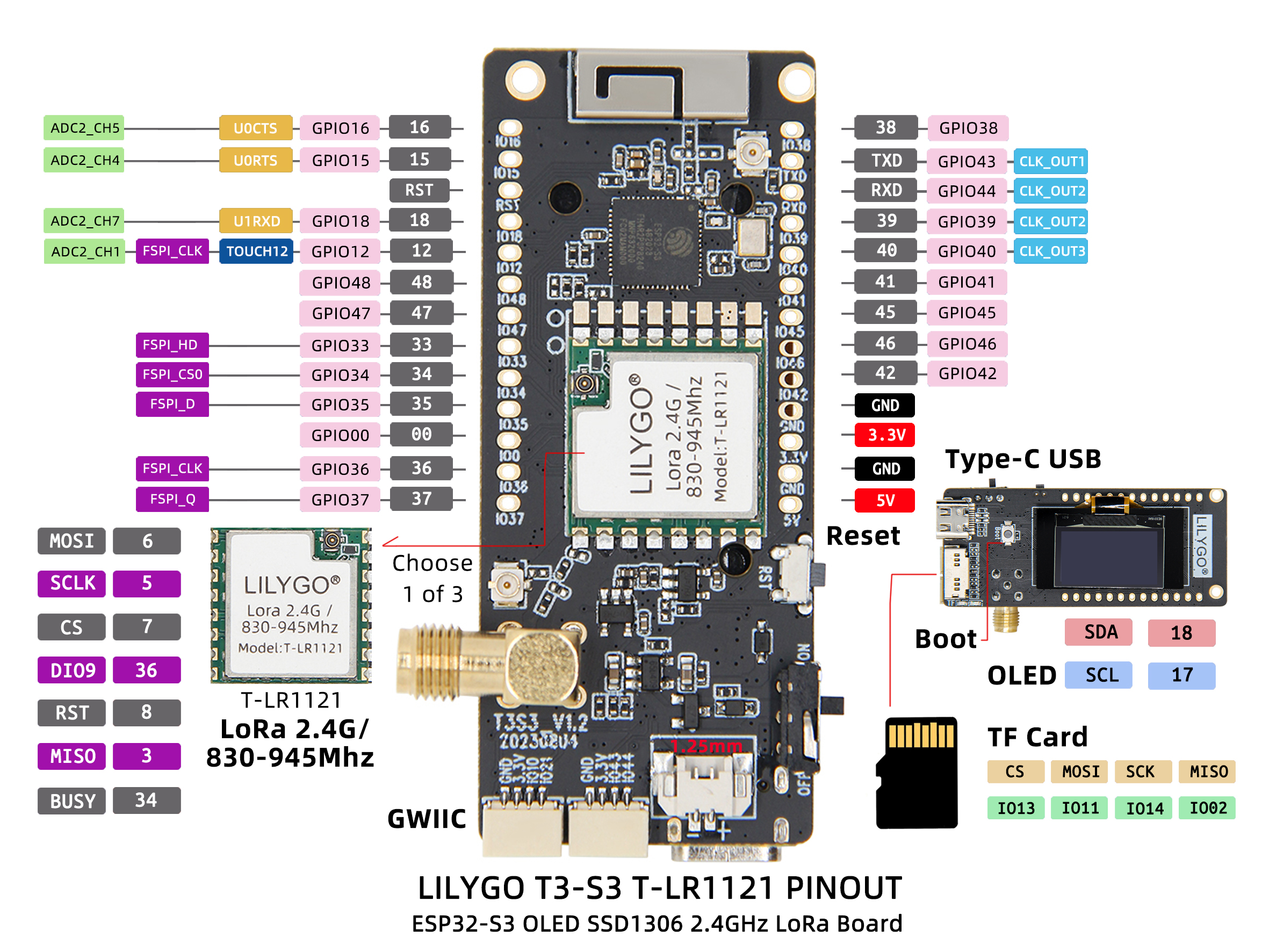
Pin Diagram
Pin Mapping
| Signal | GPIO | Available |
|---|---|---|
| QWIIC Uart1 TX | 43 | ✅ |
| QWIIC Uart1 RX | 44 | ✅ |
| QWIIC IO10 | 10 | ✅ |
| QWIIC IO21 | 21 | ✅ |
| I2C SDA | 18 | ❌ |
| I2C SCL | 17 | ❌ |
| SD CS | 13 | ❌ |
| SD MOSI | 11 | ❌ |
| SD MISO | 2 | ❌ |
| SD SCK | 14 | ❌ |
| LoRa SCK | 5 | ❌ |
| LoRa MISO | 3 | ❌ |
| LoRa MOSI | 6 | ❌ |
| LoRa RESET | 8 | ❌ |
| LoRa DIO9 | 36 | ❌ |
| LoRa BUSY | 34 | ❌ |
| LoRa CS | 7 | ❌ |
| BOOT Button | 0 | ❌ |
| Battery ADC | 1 | ❌ |
| Onboard LED | 37 | ❌ |
Dimension Diagram
Schematic
Datasheet
Software Development
Dependent Libraries
FAQ
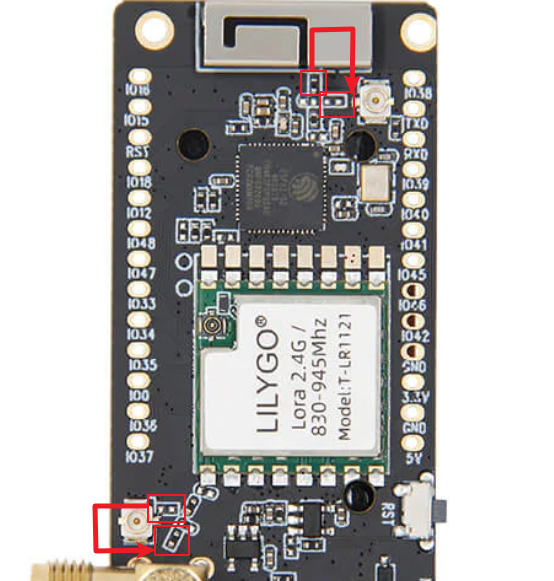
Q. How to adjust the external antenna resistor? A. Refer to the image below for resistor direction adjustment:
Q. What advantages does LR1121 have over traditional LoRa chips? A. LR1121 supports dual-band (Sub-GHz + 2.4 GHz), providing greater deployment flexibility and better anti-interference capability.
Q. Can dual bands work simultaneously? A. LR1121 supports band switching but cannot transmit and receive data on both bands simultaneously.
Q. What factors affect communication distance? A. Communication distance is affected by environmental obstacles, antenna gain, transmission power, data rate, and other factors.
Q. Upload fails? A. Hold BOOT, press and release RST, then click Upload.
Version History
| Version | Release Date | Update Description |
|---|---|---|
| T3-S3-LR1121_V1.3 | 2024-03-25 | Initial hardware version |
| T3-S3-LR1121_V1.4 | 2024-06-18 | Software optimization update |
Related Tests
RF Performance
| Frequency Band | Communication Distance | Data Rate |
|---|---|---|
| 830–945 MHz | 10 km+ | 0.3–50 kbps |
| 2.4 GHz | 2 km+ | 0.3–50 kbps |
LR1121 Specifications
| Feature | Details |
|---|---|
| RF Module | LR1121 |
| Frequency Range | 400–520 MHz / 830–945 MHz / 2400–2500 MHz |
| Transfer Rate (LoRa Sub-1GHz) | 0.018–62.5 kbps |
| Transfer Rate (FSK Sub-1GHz) | 0.6–300 kbps |
| Transfer Rate (LoRa 2.4 GHz) | 0.476–101.5 kbps |
| Modulation | LoRa, FSK, LR-HFSS |
Power and Interface
| Feature | Details |
|---|---|
| USB-C Input Voltage | 5 V |
| Solar Input Voltage (V1.3 only) | 4.5–5.6 V |
| Charge Current | 500 mA |
| Battery Voltage | 3.7 V |
| Battery Connector | PH 2.0 mm |
| QWIIC Connector | JST 1.0 mm |